


MaxiCompte has quietly become a staple for anyone trying to keep their money under control without getting bogged down in complexity. It is not just another spreadsheet replacement. It is a dedicated personal finance tool built specifically for Windows users who want clarity. The software handles income, expenses, and future budgets with a level of simplicity that defies the usual learning curve associated with financial tracking.
“Unlike many competitors, MaxiCompte offers all features for free without intrusive ads.”
The core appeal lies in its accessibility. You do not need to be an accountant or a tech wizard to make it work. The interface is designed for novices but retains enough depth for power users who want detailed categorization and long-term analysis. For French-speaking users especially, this is a breath of fresh air. Most budgeting software defaults to English. MaxiCompte speaks your language, literally and figuratively.
Why MaxiCompte Stands Out in a Crowded Market
Most budgeting apps operate on a “freemium” model. You get the basics for free, but the good stuff—the detailed reports, unlimited accounts, or advanced projections—is locked behind a paywall. MaxiCompte rejects this model entirely. It is freeware. Every feature is available from the moment you install it. There are no subscriptions. There are no hidden costs. There are also no pop-up ads cluttering your screen while you try to balance your checkbook.
This approach matters because financial anxiety is real. When a tool asks for more money or your data, trust erodes. MaxiCompte keeps your data local on your machine. It does not require you to create an account. It does not ask for personal information to unlock functionality. It just works. This transparency creates a secure environment for managing sensitive banking information.
Downloading and Installing MaxiCompte on Windows
Getting the software onto your machine is straightforward. The official source for the latest version is typically through trusted tech portals like Futura-Sciences. You click the download link, grab the executable file, and run it. The process is guided. It is not buried behind complex configuration screens.
The compatibility list is broad. It runs smoothly on Windows 7, Windows 8, Windows 10, and Windows 11. If you are still on an older system, it will likely work. If you are on the latest build, it will also work. The requirement is simply a standard Windows configuration.
Installation takes minutes. Once finished, the software is ready to use. No account creation. No email verification. Just open it and start entering your transactions. This lack of friction lowers the barrier to entry. People often abandon budgeting apps because they are too hard to start. MaxiCompte removes that hurdle.
Managing Updates and Data Migration
Software rots if it is not maintained. MaxiCompte receives regular updates. These patches address security vulnerabilities, improve compatibility with newer Windows updates, and add minor feature refinements. You can trigger this check manually by navigating to the “Help” or “About” menu within the application. The software will search for the latest version available by the developer.
Migrating from an older version is equally painless. You do not need to export and import complex CSV files. When you install a new version over an old one, the installer detects your existing database. It prompts you to upgrade the format. Your data remains intact. You lose nothing. This continuity is rare in consumer software. Many apps force you to start fresh with every major update, which is a massive deterrent for long-term users.
Limitations Beyond Windows
Here is the catch. MaxiCompte is strictly a Windows application. There is no native version for macOS. There is no Linux support. There are no mobile apps for iOS or Android. If you are deep in the Apple ecosystem or rely heavily on mobile budgeting, this tool will not integrate with your daily workflow.
You can try to bypass this using virtualization. Tools like Parallels on Mac or Wine on Linux can sometimes run the Windows executable. But this is not officially supported. It is a workaround. It requires technical know-how. It is prone to breaking. For the average user, MaxiCompte is a desktop-only solution.
This creates a specific niche. It targets desktop-centric users who prioritize privacy and one-time-install simplicity over cross-platform syncing. It is not for everyone. But for those who want a robust, free, private budgeting tool on their PC, it remains one of the best options available.
The question is whether you trust your financial data to the cloud or prefer it sitting quietly on your hard drive. MaxiCompte chooses the latter. It offers control. It offers silence. It offers a space where your numbers are yours alone.

Why MaxiCompte Fits Your Daily Budgeting Needs
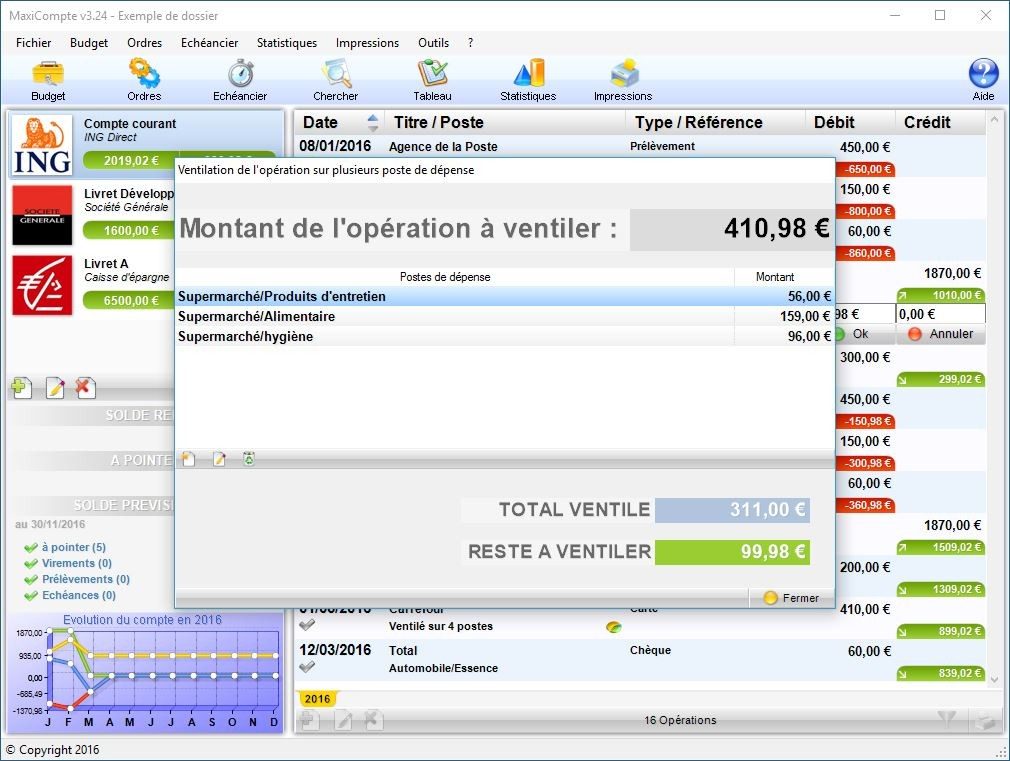
MaxiCompte isn’t trying to be a banking suite for hedge funds. It’s built for the messy reality of daily money management. Whether you’re tracking personal spending, handling family shared finances, or managing a small association’s books, the tool keeps things organized without the headache. The interface is straightforward. You get multi-account tracking, income and expense logging, and automatic categorization of transactions.
The real time-saver? Reconciliation. Instead of manually matching every line item from your bank statement, the software crosses-references your entered operations with official records. It flags discrepancies so you can fix them quickly. That cuts down on the tedious data entry phase significantly.
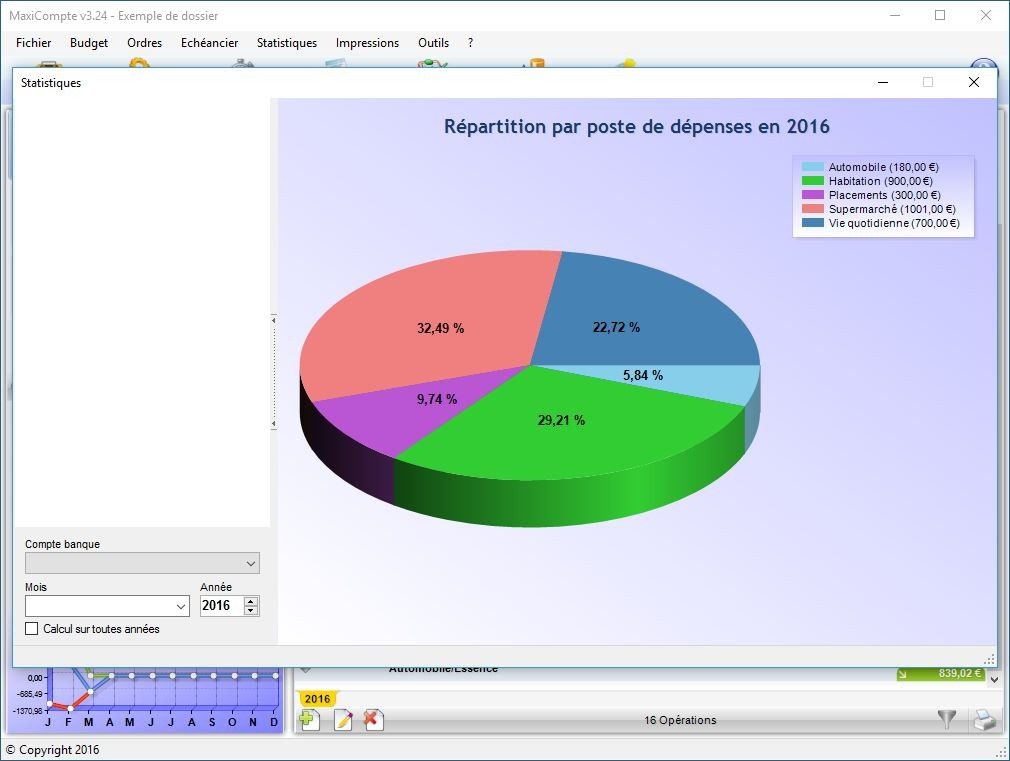
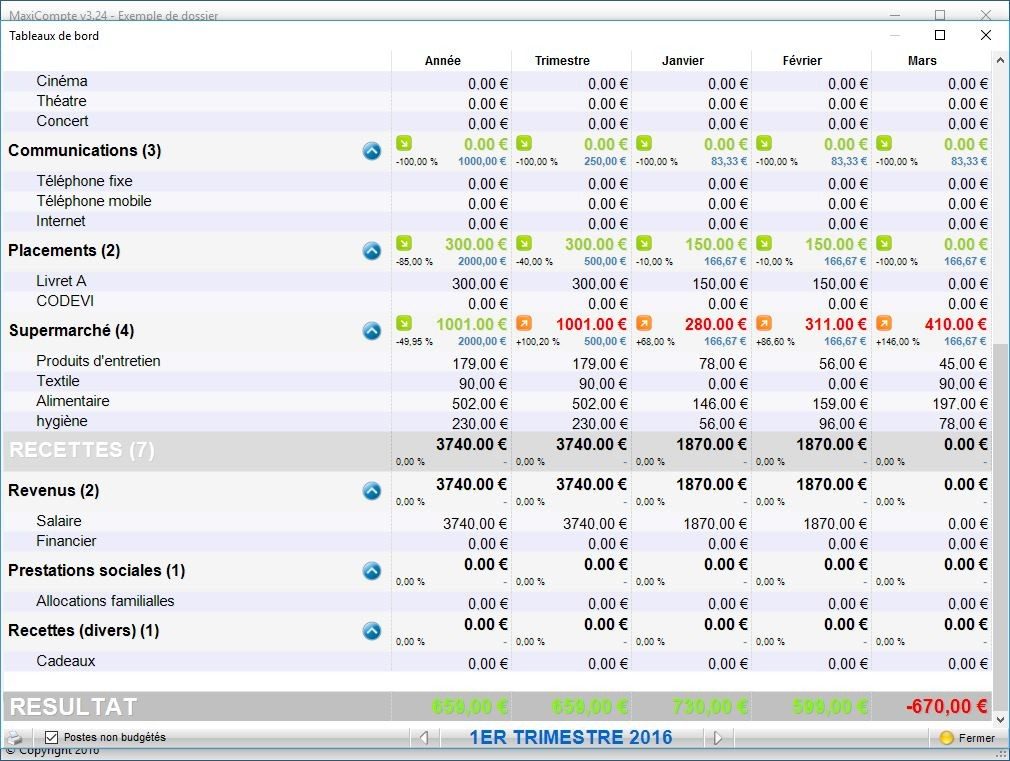
For visual learners, the budgeting features shine. You can dig into cash flow with charts and historical data. The predictive budgeting tool is particularly useful for anticipating upcoming critical expenses. It forces you to make financial trade-offs before money is gone. And if you need to move data out? Exporting to Excel or generating detailed statements is built-in.
It’s free. No premium tier. No “student version” upsell. The developers chose an open-access model with no functional restrictions. That’s a rare move in modern software.
Is MaxiCompte Compatible With Your System?
If you’re running Windows, you’re likely covered. The software supports Windows 7, 8, 8.1, 10, and 11. This broad compatibility is a deliberate choice. It ensures that users with older hardware or those who haven’t migrated to the latest OS can still access the tool. For individuals, students, or non-profits stuck on legacy systems, this matters. It doesn’t require a shiny new machine to function.
How MaxiCompte Compares to Alternatives
MaxiCompte stands out for its ease of use and stability on Windows. But it’s not the only option. If you need cross-platform support (like Linux or macOS), you might look at Grisbi or Comptabilité Personnelle. These alternatives often boast open-source architectures and broader OS compatibility.
However, MaxiCompte’s strength lies in its simplicity. It’s widely adopted by French-speaking users because it just works on Windows without complex setup. If you’re weighing which personal budget software to use, the choice often comes down to your OS preference and comfort level. MaxiCompte prioritizes a gentle learning curve over feature bloat.
Data Security and Local Storage
Where does your data live? Locally. On your machine. No remote servers. No cloud syncing by default. This architectural choice mitigates the risk of remote data breaches. Your financial information stays behind your firewall.
But local storage cuts both ways. If your hard drive fails, your data is gone unless you’ve backed it up. The software offers automatic backups and the option to create manual copies. The onus is on you to maintain external copies. Regular external backups are non-negotiable for long-term data preservation.
Getting Help and Accessing Older Versions
There’s no official customer support hotline. No certified training programs. No corporate help desk. Support comes from the community. Forums, online documentation, and user guides fill the gap.
The interface is intuitive enough that most users self-train quickly. Video tutorials and explanatory articles are scattered across the web. They help you master advanced features without formal instruction.
What if you need an older version? Maybe your system is too old for the latest build, or you prefer a specific interface layout from a past release. Several download platforms archive previous MaxiCompte versions. You can find them.
But sticking to the latest version is generally advised. You get the latest bug fixes and security patches. The open nature of the project encourages community feedback, which drives continuous improvement. This ecosystem keeps MaxiCompte relevant in the French Windows software library. It bridges the gap between novices and power users who want to customize their financial tracking. The community shares tips and best practices, ensuring the tool remains accessible and effective.
So, is it perfect for everyone? Probably not. If you need real-time cloud collaboration or mobile apps, you’ll look elsewhere. But for a stable, free, local-first budgeting tool on Windows, it holds its ground. The lack of forced updates or subscription fatigue has its own kind of appeal. You keep your data. You keep your money. And you keep your system running.
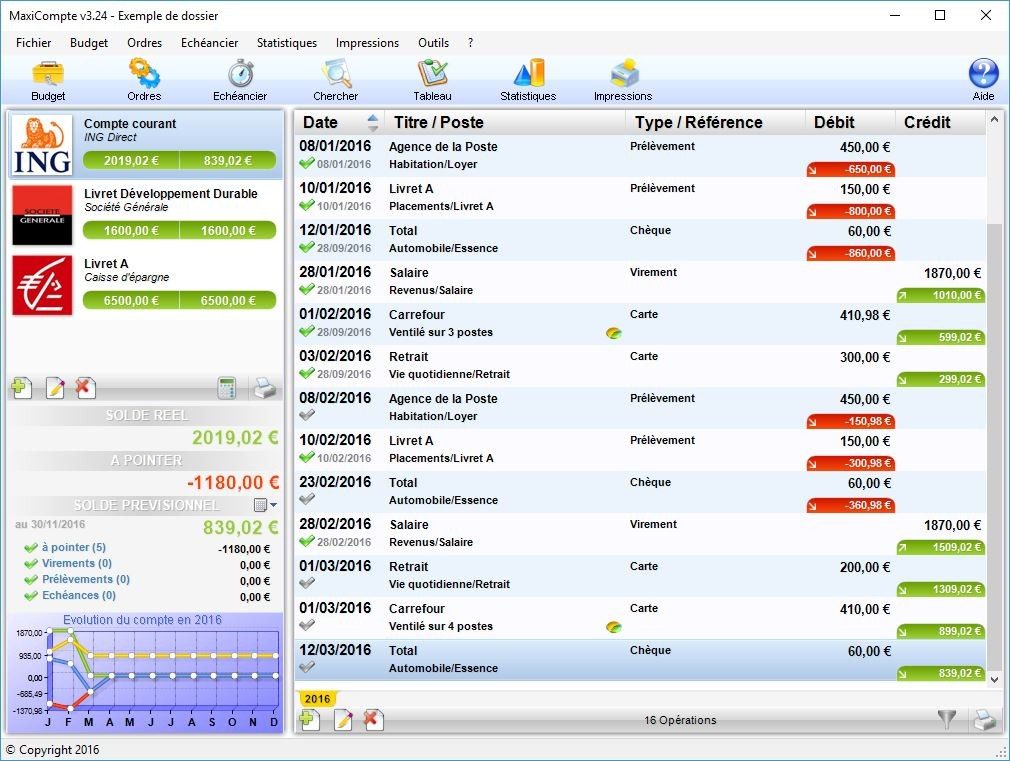
Forget the cloud. If you are tired of subscribing to yet another personal finance app that syncs your spending habits to a server you don’t trust, MaxiCompte offers a refreshing change of pace. It is a local-only budgeting tool. No account creation. No mandatory internet connection. Just you, your money, and your hard drive.
Before you download, check if this fits your setup. It is designed for Windows environments, ranging from modern machines to legacy systems like Windows 7. The approach is straightforward: keep data offline, ensure privacy, and avoid bloatware.
System Requirements and Compatibility
The software is lightweight. The installer is just a few megabytes. You do not need a supercomputer to run it. A standard Windows PC with administrative rights is enough.
Here is what you need to know about compatibility:
- Supported OS : Windows 11, 10, 8.1, 8, and 7. Both 32-bit and 64-bit architectures are supported.
- Interface Language : French. This is important. If you do not read French, this might not be for you.
- Hardware : Standard keyboard, mouse, and monitor. No specialized input devices required.
This broad compatibility means older hardware isn’t left behind. You can still manage your budget on a ten-year-old laptop running Windows 7. It runs locally. There is no lag from server latency. There is no dependency on external servers going down.
Installation and Data Privacy
The installer is standalone. You download it from a trusted source like Futura. There are no ads. There is no bundled junkware. The setup process is minimal. You click, you agree, you are done.
Your data stays on your machine. This is the core selling point. For users concerned with financial data privacy, keeping transaction records off the internet is a significant advantage. You are not feeding an algorithm your spending habits.
Updates are handled internally. You do not need to visit a website to check for patches. Use the built-in menu under Aide/À propos (Help/About). The software checks for updates directly. This reduces the need to browse the web just to stay current.
Data Management and Exports
Since there is no automatic cloud backup, you are responsible for your data. This is a trade-off for privacy. You must perform manual backups. The software allows you to create backup files for archiving. Copy them to an external drive. Store them in a secure folder.
When it is time to analyze trends or merge data with other tools, use the export function. MaxiCompte supports CSV format. This is compatible with Excel, LibreOffice, and other spreadsheet software.
“Exporting to CSV means you own your data in a universal format. You are not locked into a proprietary database structure.”
This flexibility is useful for students, small associations, or anyone who prefers detailed, custom analysis over a dashboard’s summary views. It works well for domestic use where simple, reliable tracking is all that is needed.
Why This Approach Matters
In an era where every app wants your location and your browsing history, offline budget software is a niche but valuable category. MaxiCompte serves this niche by stripping away everything unnecessary.
It answers a specific need: simple, secure, local financial tracking. It does not try to be an investment tracker. It does not try to connect to your bank automatically. It is a manual entry tool for those who want control.
The distribution is free. It is freeware. You get it from reliable sources. There are no hidden costs. There is no premium tier gating basic
The Hidden Cost of Cloud Simplicity
The promise of managed services is seductive. You pay a premium, and suddenly, patching, scaling, and security monitoring are someone else’s headache. It sounds like a win-win until the invoice arrives and the silence begins. That silence is the sound of you losing visibility into your own infrastructure. You stop knowing how things work because you stopped being involved in how they break.
This trade-off is the central tension in modern IT strategy.
Where the Abstraction Leaks
Managed services don’t eliminate complexity. They relocate it. Instead of debugging a kernel panic on a bare-metal server, you are now debugging a black-box API call that returns a generic 500 error. The vendor absorbs the operational toil, but they rarely absorb the business logic.
Consider data residency. You might think moving to a public cloud solves compliance, but it doesn’t. If your industry requires specific geographic boundaries for data storage, the “anywhere” nature of cloud infrastructure becomes a liability. You still have to configure the zones, manage the encryption keys, and audit the logs. The vendor provides the cage. You provide the key. And if you lose the key, you lose the data. Permanently.
Which Provider Fits Your Constraints?
Not all managed services are created equal. The distinction between IaaS (Infrastructure as a Service), PaaS (Platform as a Service), and SaaS (Software as a Service) isn’t just marketing jargon. It dictates where your responsibility ends and theirs begins.
- IaaS gives you the virtual hardware. You manage the OS, middleware, and runtime. High flexibility. High maintenance.
- PaaS removes the OS layer. You focus on code and data. You lose control over the underlying stack.
- SaaS handles everything. You just use it. You have zero control over updates, outages, or feature sets.
If your application requires specific hardware optimizations or deep kernel-level tuning, a fully managed SaaS solution will choke. It’s too rigid. But if you are building a standard web app, fighting IaaS is a waste of engineering hours. The choice depends entirely on your velocity requirements versus your control requirements.
Why Lock-In Matters More Than Cost
Vendors want you to stay. They use proprietary tools, specific data formats, and complex billing structures to make leaving painful. This is vendor lock-in. It’s not just about switching fees. It’s about the time cost of rewriting integrations.
A migration from AWS to Azure isn’t just a DNS change. It’s a re-architecting of identities, networks, and storage classes. The friction is intentional. To mitigate this, you must adhere to abstraction layers. Use containers. Standardize on open-source formats where possible. Keep your configuration as code, not as a series of clicks in a web console.
How to Regain Control Without Losing Sleep
You don’t have to go back to managing physical servers to get visibility. The middle ground is observability. Even in a managed environment, you must instrument your applications. You need to know what the service is doing, not just that it is running.
Implement distributed tracing. Log structured data. Set up alerts that mean something. A generic “server down” alert is useless. An alert that triggers only when latency exceeds 200ms *and


