



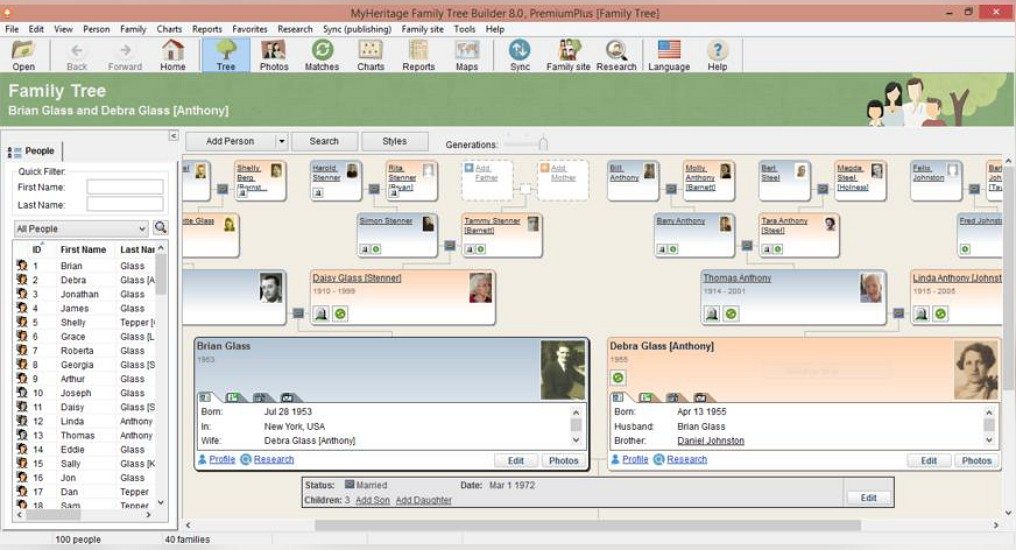
MyHeritage Family Tree Builder is not just a digital scrapbook. It is a robust desktop application designed for people who want more than a basic online chart. It lets you model complex family structures, trace strict lineages, and preserve a digital heritage that outlives the people who built it. The interface is clean. It is intuitive. But don’t mistake simplicity for lack of power.
You can add scanned documents. Individual bios. Photos with metadata. This transforms a static tree into a living narrative. It becomes an interactive timeline.
“The software allows users to import and export files in common formats like GEDCOM, facilitating the continuation and sharing of research.”
This matters because genealogy is messy. Human memory fails. Records get lost. MyHeritage Family Tree Builder acts as an analytical engine. It cross-references historical databases. It detects potential kinship links. It flags duplicates. It spots inconsistencies. This level of scrutiny is why professional genealogists and amateur historians trust it. They need validation, not just decoration.
Cross-Platform Sync and Data Portability
The real value here is connectivity. The software syncs directly with the MyHeritage online platform. This means you aren’t locked into a silo. You gain access to their vast international database. You get automatic ancestor suggestions. You can connect with other compatible family trees.
Collaboration is built in. Multiple family members, scattered across different countries, can contribute to the same tree. It stays updated. It stays detailed.
Data portability is equally critical. The tool supports GEDCOM file imports and exports. If you switch platforms later, you aren’t stranded. You can take your hard work with you. This is a practical feature that prevents vendor lock-in.
Installation and Device Compatibility
MyHeritage Family Tree Builder isn’t limited to one type of machine. It runs on Windows and macOS. The installation process is straightforward. The setup wizard guides you from destination folder selection to initial configuration. It’s quick. It’s safe.
But the desktop isn’t the only option. There are native apps for Android and iOS (iPhone and iPad). This multi-platform approach is essential. You can view, edit, and enrich your tree from a tablet or smartphone. For nomadic users or those who want to check records while traveling, this accessibility is non-negotiable.
Security and backup are handled via the online service. Your tree is saved permanently in the cloud. If your main computer crashes, you haven’t lost your history. You can pick up right where you left off on a new device.
Handling Older Hardware and Updates
What if you’re running an older machine? MyHeritage publishes regular updates to keep the software compatible with the latest operating systems. However, they also archive older versions. This allows users with legacy configurations to download a compatible release. It’s a practical solution for those who can’t or won’t upgrade their hardware immediately.
The sync feature ensures that even if your primary device is inaccessible, your data remains safe and available. This dual approach—modern features for new devices, backward compatibility for older ones—covers all bases.
Creating a free account on MyHeritage unlocks these capabilities immediately. You can start building from scratch or import existing GEDCOM files. The analytical tools and visualization features are ready to go.
Why stick with a static PDF when you can have a dynamic, searchable, and collaborative database? The technology is there. The question is whether you’re willing to put in the work to curate your history properly.
How MyHeritage Family Tree Builder Compares to Other Genealogy Software
You want to build a family tree. You have choices. Heredis, Généatique, Gramps — they all work. They map branches. They handle data. But MyHeritage Family Tree Builder does something different. It doesn’t just sit on your hard drive. It reaches out.
The difference is in the connection. Most desktop genealogy programs are silos. You type, you save, you stare at a screen. MyHeritage links your local software directly to its global online platform. This isn’t just a sync button. It’s an intelligent bridge.
Why does this matter? Because your family tree is likely incomplete. You know your grandparents. Maybe their parents. But the rest? That’s where the billions of profiles come in. The software uses advanced algorithmic intelligence to suggest relationships. It scans global archives. It finds matches you never would have seen digging through physical records alone.
This accelerates discovery. You fill gaps faster. You uncover unknown branches with a level of reliability that manual entry can’t match. It automates the heavy lifting. You get the structure; the system provides the context.
The Pricing Model: Free vs. Premium Features
Let’s talk money. This is where the strategy shifts. Many competitors lock essential features behind paywalls immediately. MyHeritage starts differently.
The base version is free. And it’s robust. You can build a tree with several hundred members. You can upload photos. You can print charts. You can import and export data without restriction. For casual users, this covers the basics. It’s enough to start.
But what if you want more? What if you need the deep search?
That’s when the premium tiers kick in. The “Premium” and “Premium Plus” subscriptions unlock automated genealogical research. They give you unlimited access to historical archives worldwide. They remove the cap on tree size. They offer priority support.
The cost scales with your ambition. Occasional family history projects stay affordable. Professional genealogists needing intensive tools pay for the power.
There are other pathways too. Students, educators, and researchers get specific offers. These change based on promotions or institutional deals with universities. The goal is accessibility. It’s not just for experts. It’s for anyone curious enough to look back.
Updates are regular. You can set them to install automatically. Or trigger them manually. This ensures you always have the latest security patches and feature enhancements. No legacy bugs holding you back.
Usability, Backup, and Learning Resources
Installation is straightforward. The interface is designed for all skill levels. It guides you. Step by step. Adding a new member? Managed. Editing individual info? Clear. Creating documents? Intuitive.
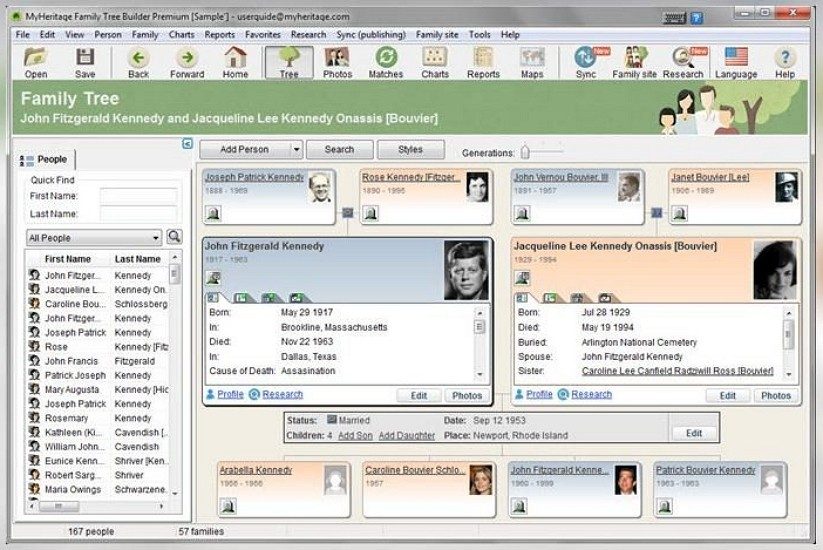
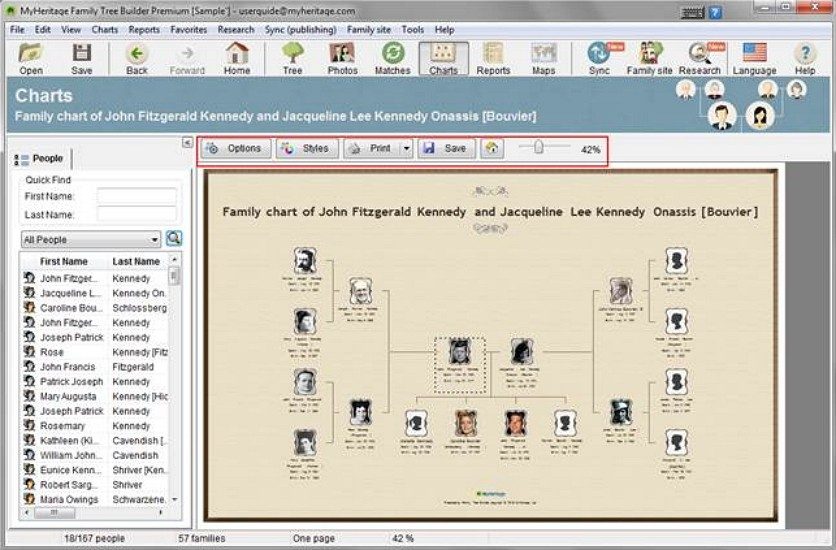
The visual options are flexible. You can switch from a traditional tree view to chronological timelines or patronymic charts. This helps you understand complex relationships quickly. Visuals clarify what text sometimes obscures.
Learning doesn’t stop at the manual. MyHeritage provides a wealth of resources. Video tutorials. Detailed user guides. Webinars. Occasionally, live online workshops teaching modern genealogical techniques. You’re not alone in this.
Data safety is non-negotiable. Lost data is a genealogist’s nightmare. Family Tree Builder offers multiple backup strategies.
- Local storage on your computer.
- Automatic synchronization with the MyHeritage cloud.
- GEDCOM export for sharing or archiving elsewhere.
This triad ensures permanence. Hardware failure won’t erase your life’s work. You work with confidence.
Sharing is controlled. You can invite family members to contribute. They can add photos or correct facts. You maintain privacy controls. Everyone sees what they’re allowed to see. Collaborative, yet secure.
For those seeking deeper expertise, certified training exists. Specialized networks and educational partners offer courses. These teach rigorous methodology. They cover source validity. They explain how to use analytical tools for scientific research.
Technical support is available too. Questions? Installation help? Need an older version for an outdated PC? The support team handles it.
This ecosystem combines openness, security, and intergenerational sharing. It’s not just software. It’s a infrastructure for memory. And it keeps evolving.
How MyHeritage Family Tree Builder Handles Data and Syncing
Most people think genealogy software lives solely on a desktop. It doesn’t. MyHeritage Family Tree Builder operates as a hybrid ecosystem. You work offline in the desktop app. You edit on a phone. You view on the web. The magic isn’t in the code itself, but in how it bridges those gaps.
The core mechanic is synchronization. It’s optional via a MyHeritage account, but skipping it defeats the purpose of a connected service. You build locally. You push to the cloud. You pull updates from relatives or new record matches. This workflow matters because genealogy is collaborative. Your tree is static until you connect it to the network.
Platform Compatibility and Offline Use
The software supports Windows and macOS for the desktop experience. Android and iOS handle mobile access. There is also a browser-based web service. This triad covers nearly every modern device. You aren’t locked into one ecosystem.
Offline use is fully supported on the desktop application. This is critical for large projects with thousands of records. Loading every photo and document from the cloud takes time. Local access is instant. When internet connectivity returns, the app syncs changes. Conflicts are rare if you don’t edit the same person on two devices simultaneously. But the architecture assumes you won’t do that.
File Formats and Import/Export Mechanics
GEDCOM remains the standard. .ged files are the lingua franca of genealogy. MyHeritage handles them without friction. You can import existing trees from other platforms. You can export your work for backup or migration. This interoperability prevents vendor lock-in, a common pain point in niche software.
Media support is robust. JPEGs and PNGs for photos. PDFs for documents. Common attachment formats are also accepted. The app generates printable reports. It creates shareable tree views. These features cater to both the digital archivist and the family historian who wants a physical book.
Privacy Controls and Account Management
MyHeritage uses a freemium model. The base software is free. Advanced features—like unlimited record matches or higher storage—require a subscription. This lowers the barrier to entry. You can test the waters without paying.
Privacy settings are granular. You control who sees your tree. You manage access rights. Invitations are sent to specific users. This is important for living persons. You don’t want your uncle’s private data exposed to the public. The software respects those boundaries.
Minimum System Requirements and Performance
There is no rigid minimum spec sheet. A standard home computer suffices. Disk space varies. A small tree with few photos uses little room. A massive project with high-resolution scans fills drives quickly. Plan accordingly.
The desktop app is not lightweight. It’s a data hub. If your machine is sluggish, the interface may lag during heavy syncs. But for most users, performance is adequate. The focus is on functionality, not speed.
Why This Matters for Everyday Users
You aren’t just storing names. You’re preserving context. The sync capability means your research travels with you. Lose your laptop? Your data is safe in the cloud. Change phones? Your tree is there. This continuity is the real value. It transforms a static database into a living family resource.
The freemium structure allows casual users to start for free. Serious researchers can upgrade as they go. The flexibility accommodates both. You aren’t forced into a rigid tier system upfront.
Final Considerations
Download from the official source. Create an account. Enable sync if you want collaboration. If you prefer isolation, you can stick to local files. But the web features—record hints, DNA matching, shared trees—are where the platform shines. Without them, you’re just using a fancy spreadsheet.
The technology is mature. It handles the messy reality of family histories. Names change.
The Hidden Costs of Switching Backends
Moving away from a managed platform isn’t just about escaping fees. It’s about accepting that you now own the plumbing. You’re no longer paying for convenience; you’re paying for uptime.
This shift forces a hard look at infrastructure as code. If your database lives in a managed cloud service, scaling is a button click. If it’s on your own VPS, scaling is a script that might fail at 3 AM. The trade-off is clear. You gain control. You lose sleep.
Consider the migration itself. It’s rarely a one-night lift-and-shift. Data consistency becomes the enemy. How do you handle schema changes without downtime? Which tools actually sync efficiently between SQL and NoSQL backends? The answers depend entirely on your stack.
Why Developers Are Leaning Toward Self-Hosting
The trend isn’t just cost-driven. It’s about ownership. When you self-host, you dictate the terms. No vendor lock-in. No sudden API changes that break your app. No privacy policies that shift overnight.
This matters for small teams. A startup with limited capital can’t afford enterprise support contracts. They need flexibility. They need to tweak a config file rather than open a ticket. Self-hosting offers that agility.
But there’s a catch. Security. You are now the security team. Patching your own servers means staying vigilant. One unpatched CVE can compromise everything. The burden shifts from the provider to you.
Where Self-Hosting Falls Short
It’s not for everyone. Some applications demand high availability that’s hard to replicate solo. If your service goes down for an hour, do you have the resources to fix it? Or are you waiting on a weekend?
Latency is another factor. A self-hosted instance in a single location might lag for users on the other side of the globe. CDNs help, but they add complexity. Managed services often include global distribution by default. Replicating that requires significant DevOps effort.
And let’s talk about backup. Automated, redundant, off-site backups are standard in cloud offerings. In self-hosting, they’re a project. Do you have the discipline to run them daily? If not, you’re gambling with your data.
The Verdict: Is It Worth The Shift?
For many, yes. The financial relief is real. The technical learning curve is steep but rewarding. You become better at understanding your own system. That knowledge is a competitive advantage.
For others, no. The stress isn’t worth it. If your core business is code, not server management, stick to managed services. Your time is better spent on features users love.
The choice isn’t binary. Hybrid models exist. You can self-host the database while keeping auth on a third party. You can use managed storage with custom compute. It’s about finding the right balance for your specific needs.
What’s your experience? Have you pulled the trigger on self-hosting? Or are you still weighing the options? The conversation is ongoing. And the landscape keeps changing.