




The setup phase is done. Your machine is ready. Now you need the actual data.
This means hunting down .torrent files. You can do this the old-fashioned way. Type “.torrent” into a search engine. You will find sites offering them. There are also dedicated indexers.
isoHunt and TorrentSpy are well-known examples. They act as directories. They don’t host the files. They just point you to them.
Then there are specific hubs. bt.etree.org is a goldmine for shareable live music. If you want legal content, check Legal Torrents for music, videos, and books. BT on EFnet tracks recent television shows. These sources help you locate the right magnet or file.
The Download Process
You found what you need. Now, how do you get it?
Right-click the .torrent link. Select “save target as.” This is critical. You are not downloading the movie, the game, or the album yet. You are downloading a pointer. A small text file that tells your client where the data lives.
Save this file somewhere easy to reach. The Windows desktop works fine. It downloads instantly because it is tiny.
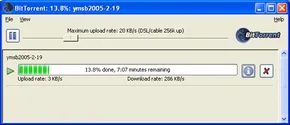
Once the file sits on your drive, double-click it. Your BitTorrent client wakes up. It reads the info-hash. It contacts trackers. It starts the real work.
Why Swarm Size Matters
Speed is the next concern. It is not random. It depends on the swarm.
Think of the swarm as a group of neighbors sharing a pizza. If there are 100 people with slices, you get bites fast. If only two people have the pizza, you wait. Long.
The more computers in the sending and receiving swarm, the quicker the transfer. Simple math. More sources mean more bandwidth.
If you are downloading a niche file with only a few peers, the speed will be slow. Very slow. Sometimes painfully so. There is nothing you can do about it except wait.
The Responsibility of Seeding
This is where most people mess up.
They download the file. They watch it. They close the client. They are gone.
Do not do this.
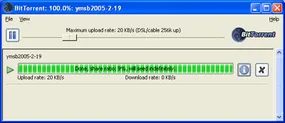
Leave the BitTorrent client open after the download finishes. Let it seed. Other peers need your copy. The protocol is built on reciprocity. You take. You give back.
If you close the client immediately, you break the cycle. You become a leech in the literal sense. The file degrades. The swarm shrinks.
It is not complicated. It is just basic netiquette. Keep the port open. Let the upload counter tick up. It takes little effort. It keeps the system alive.
And if your connection drops? The client remembers. It resumes. The swarm persists. As long as someone is seeding, the data survives. It is a fragile ecosystem. You are part of it now.
Your computer doesn’t just take. It gives back.
When peers connect via BitTorrent, they aren’t blindly grabbing data. They are negotiating. You download a .torrent file. This is a small pointer, not the media itself. It tells your client where to find other computers hosting pieces of the larger file.
Once your copy is complete, something shifts. Your machine becomes a seed.
A seed holds the full file. It uploads pieces to others. This isn’t altruism. It’s the tit-for-tat protocol. The software prioritizes peers that upload to it. If you stop seeding, the swarm slows down for you. Speed is tied to contribution.
Leave the client running. Overnight works best. The goal is to build a pool of seeds. More seeds mean faster downloads for everyone. Including you.
Close the software when you are done. The process stops. The connections drop.
The Legal Reality of P2P Sharing
BitTorrent handles large files with ease. Video files are the main attraction here. Large size. High demand.
The Motion Picture Association of America (MPAA) knows this. They have filed countless lawsuits. Many high-traffic .torrent sites have shut down as a result.
The software itself is legal. The act of downloading copyrighted material is not.
You are responsible for the files you select. The protocol does not hide your identity. Your IP address is visible to every peer in the swarm. Tracing back to your home connection is straightforward for copyright holders.
Despite the legal gray areas surrounding user behavior, the underlying technology remains innovative. It uses an open-source philosophy. It builds a legacy of efficient data distribution. It serves as a bridge to how we expect file-serving software to work in the future.
Decoding BitTorrent Jargon
Internet culture breeds its own language. BitTorrent is no exception.
Understanding the terms helps you manage your client better.
- Leeches – Users who download files but do not upload them. They take without giving.
- Seed or seeder – A computer holding the complete file. At least one seed is required for a swarm to function. Without it, the file becomes inaccessible once the original uploader leaves.
- Swarm – The group of computers simultaneously uploading or downloading the same file. This collective activity is the core of the protocol.
- .torrent – The pointer file. It contains metadata about the file and tracker information. It directs your computer to the swarm.
- Tracker – A server that manages the file-transfer process. It connects peers. It does not host the files.
The Hidden Cost of Uploading
Check your ISP plan.
Most providers offer unlimited data. Some do not.
If your ISP charges for uploads, BitTorrent could cost you. The tit-for-tat protocol encourages you to upload aggressively to maintain download speeds. This increases your upload volume.
Before leaving your client running overnight, verify your data caps. Moving up in the hierarchy is useless if it bankrupts you.
Further Reading
If you want to dig deeper into the mechanics of file sharing, look into these related topics.
Related Articles
- How Gnutella Works
- How Firewalls Work
- How Kazaa Works
- How MP3 Files Work
- How the Old Napster Worked
- How Web Servers Work
- What are copyrights and patents?
- What does open source mean?
External Resources
- BitTorrent.com
- Brian’s BitTorrent FAQ and Guide
- BitTorrent Tweaks
Sources
- Bram Cohen’s BitTorrent Site
- Brian’s BitTorrent FAQ and Guide
- How Gnutella Works
- BitTorrent Tweaks
- etree
- BitTorrent 101, About.com
- “File Sharing’s New Face.” The New York Times, February 12, 2004.
- “The BitTorrent Effect.” Wired Magazine, January 2005.