



How #HDMI will change your home theater: The complete guide to standards and connectors
It’s a cable that connects to everything from a PlayStation to a Blu-ray player, but most people don’t know what it actually does. If you’ve ever stared at the back of your TV confused by the array of ports, chances are you’ve come across HDMI. But what exactly is it?
HDMI stands for High-Definition Multimedia Interface. It’s more than just a physical port. This is a unique set of rules that will completely change the way video and audio are transmitted between devices. Instead of confusing red, white and yellow cables or separate audio cables, HDMI combines everything into a single digital stream. Switching from analog to digital is more than just tidy up your entertainment center. It raises the level.
Development of the HDMI standard
The first version of HDMI (1.0) appeared in 2002. Since then, the standard has undergone nearly a dozen changes to accommodate better televisions and faster processors. Not all versions are listed on every box, but knowing the big changes can explain why your old cable won’t work with your new 4K TV.
The main updates to the schedule are as follows:
- HDMI 1.1 (2004): Added DVD audio support.
- HDMI 1.3 (2006): Increased bandwidth to handle deeper colors and higher resolutions.
- HDMI 1.4 (2009): Introduced 3D video and Ethernet connectivity.
- HDMI 2.0 (2013): Also known as HDMI UHD, this version increases bandwidth to support 4K resolution.
- HDMI 2.1 (2017): The current gold standard, offering massive bandwidth for next-generation features.
Manufacturers simplify home theater installation by combining video, audio and data into one cable. This integration produces an uncompressed high quality signal. The result is a viewing experience that is sharper, clearer and more immersive than analog cable.
HDMI and 8K resolution
Why is the version number important? Bandwidth. The current standard HDMI 2.1 transfer rate is up to 48 gigabits per second. This high performance enables 8K resolution (7,680 x 4,320 pixels) and 4K resolution (3,840 x 2,160 pixels) with refresh rates that make motion look extremely smooth.
By comparison, the original HD standard was a fixed 1080p. To watch 8K content, you need cables and devices that support HDMI 2.1. It can run 8K at 60 Hz. Or if you’re a gamer, you can use 4K at 120Hz. The high refresh rate eliminates motion blur, which is essential for fast-paced action.
In addition to RAW pixels, HDMI reduces clutter. Fewer cables mean fewer places for dust to collect and less chance of loose connections. The control is also simplified. When configured correctly, only one remote control is needed to control the entire system.
Different types of HDMI connectors
Not all HDMI ports look the same. The type of connector depends on the device you are using. This often creates confusion. You cannot connect a TV cable to a smartphone without the correct adapter or cable type.
There are five main types of connectors.
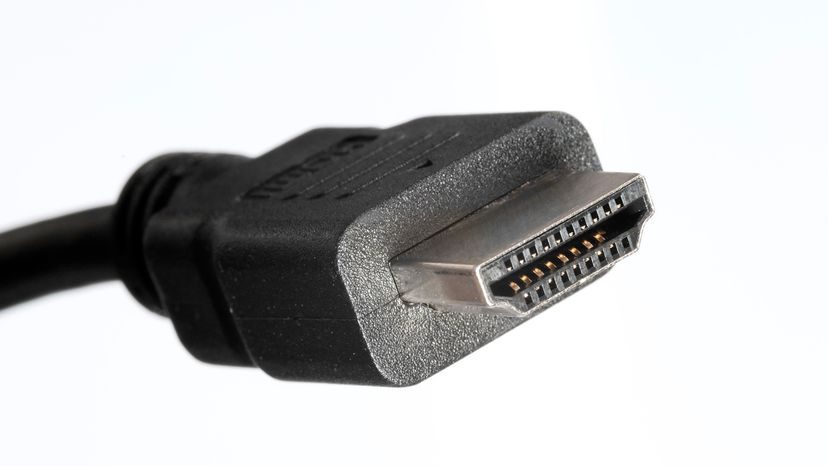
- Type A (standard): This is the large rectangular connector found on televisions, game consoles, and desktop computers. This is the most common type.
- Type B: Designed to transmit dual link video and support very high resolutions. It never caught on. There are no consumer products that actually use it.
- Type C (Mini): Smaller than Type A. Found on older DSLRs and some tablets.
- Type D (micro): Even smaller. Used in small devices such as mobile phones and action cameras.
- Type E (Automotive): Special connector used in cars. Equipped with a locking mechanism that prevents loosening while driving.
It is important to know what type your device is using. Laptops may have mini ports, while televisions have standard ports. You need a cable that matches both ends.
Practical use of HDMI cables
HDMI cables are more than just wires. There are certain features that improve the user experience. These functions typically run in the background, but they determine how devices communicate with each other.
The main features are:
- High-Speed Transmission: Handles 4K and 8K video streams without compression artifacts.
- Ethernet channel: Allows devices to share their Internet connection via HDMI cables, reducing the need for separate network cables.
- Audio Return Channel (ARC): This is a game-changer for home theaters. This allows your TV to send audio back to the soundbar or receiver using the same HDMI cable that brought the video in. There is no need to need a separate optical audio cable.
- Enhanced ARC (eARC): Upgrade to ARC to support higher bandwidth audio formats such as Dolby TrueHD and DTS-HD Master Audio.
- Consumer Electronics Control (CEC): This feature allows you to control multiple devices with a single remote control. When you turn on the TV, the soundbar also turns on.
- Alt Mode: Allows the HDMI signal to travel over USB-C ports. USB-C ports are becoming more common in modern laptops and mobile phones.
Today’s HDMI Application Scenarios
HDMI is everywhere. It’s in portable gadgets that allows you to connect the tablet to the projector for presentations. It is included with laptops and allows you to mirror your screen for a larger view.
In the world of home entertainment, it is a mainstay. All streaming devices, game consoles and Blu-ray players rely on it. Outside the home, professional AV setups use HDMI for commercial displays and conference rooms. It has become the universal language of digital video.
Technology is constantly developing. The new versions promise higher speeds and better efficiency. HDMI remains the standard. This is the invisible thread that connects your digital life to your screen. Whether you’re watching a movie or playing a game, that single cable is doing a massive amount of heavy lifting. What happens when the next standard comes? Let’s see.
How to convert standard resolution to high resolution
HDMI ports and flat screens are now everywhere. But they are not always like this.
We stayed with SDTV until HDTV took over our living room. The image is approximately square. Aspect ratio 4:3. The resolution is approximately 704 x 480 pixels. Not much.
These older devices relied on analog signals. Think of it as a changing flow. The video consists of half images. The frame changes so quickly that your brain just fills in the blanks. I don’t notice any flickering. I just saw the move.
为什么数字优于模拟
高清电视通过数字化改变了游戏规则。 一和零取代了波浪形的模拟线。 数据以不同的电脉冲形式通过电缆传输。
图像的形状也发生了变化。 高清电视使用 16:9 的宽高比。 图片是长方形的。 更宽。 按照当前标准,分辨率跃升至 1920 x 1080 像素。 更多像素意味着更多细节。
还有刷新率。 标准电视使用隔行扫描。 高清电视通常使用逐行扫描。 每一帧都是一幅完整的图片。 没有半途而废的措施。
高清电视可以处理更多颜色。 他们需要更多数据。 他们需要更快。 如果电视接收数字信号,它就不会浪费处理能力来转换模拟信号。 它只是显示它得到的内容。 清洁工。 更明亮。 快点。
The future of HDMI
HDMI is not static. The HDMI Forum is constantly updating technical information. They follow trends like 8K resolution. High Dynamic Range (HDR) is now very powerful. Game functions have also been improved.
This digital connection is still the standard for audiovisual connectivity. Seamlessly integrates between different devices. As consumer electronics evolve, HDMI is constantly adapting. You can make your old device work with your new TV.
We used a combination of artificial intelligence technology to create this article, which has been reviewed and edited by HowStuffWorks editors.
HDMI FAQ
What is the HDMI port used for?
Send and receive audio and video signals from various sources. One cable can do a lot of work.
What does HDMI mean and what does it do?
HD multimedia interface. Transmits an HD signal with one cable. Audio and video are sent together.
What does an HDMI adapter do?
Add an HDMI connection to a TV that doesn’t have one. Most modern LED TVs already have this port. Older devices may still need an adapter.
Which is better: HDMI 1.0 or 2.0?
HDMI 2.0 was announced in 2013. HDMI 2.0 handles more bandwidth than 1.0. Both can stream 4K video. However, the transfer speed of 2.0 is 18 Gbps. The maximum speed of version 1.0 is 10.2 Gbps. Speed is important for high-resolution content.
What’s the use of HDMI?
High bandwidth with one cable. Simplify your home theater installation. There are fewer cables to manage. There are fewer defects.