



The magic of 3D printing is undeniable. It feels like science fiction — creating physical objects from thin air, like a Star Trek replicator. Yet the community has a reputation to shed. For years, these machines were seen as technical beasts. Intimidating. Expensive. Reserved for hobbyists with too much time and too little social life.
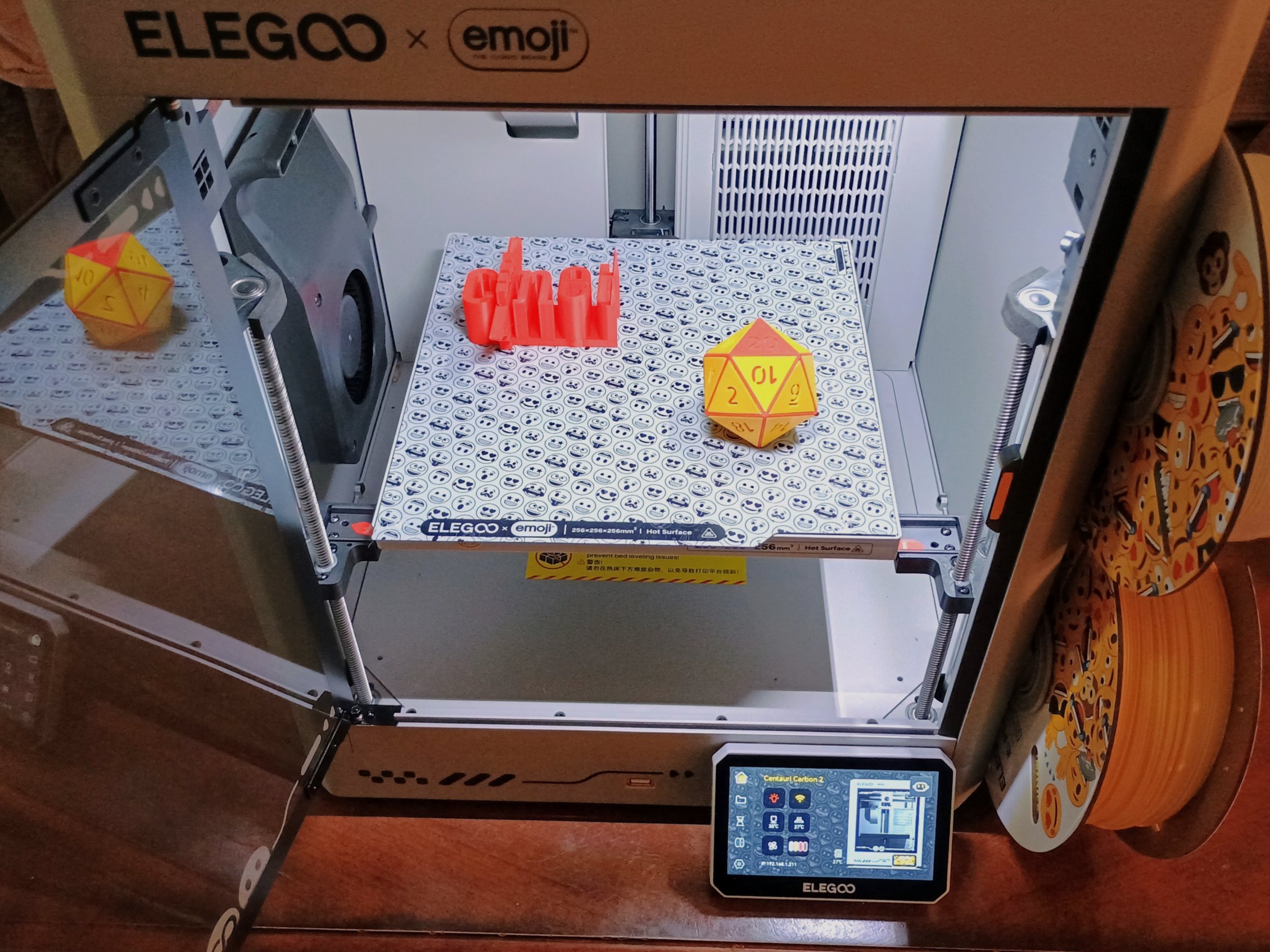
Elegoo is trying to break that mold. Enter the Elegoo x emoji Centauri Carbon 2. It’s a bright yellow, smiling box. It claims to be accessible. But is it actually easy for a complete beginner?
The answer is nuanced. The printer is excellent. The marketing is thin. The setup is… complicated.
The Heavy Lifting and The Setup Struggle
My first thought holding the shipping box: Wow. This thing is heavy.
It arrived swaddled in layers of tape, film, and packing foam. This made sense—it shipped from China—but unwrapping it was a chore. You peel back the layers like an onion of industrial protection.
Then came the assembly.
If you saw the videos online claiming this takes fifteen minutes, delete them. As a total novice, it took me just over an hour. The English manual suffers from localization quirks or perhaps the assumption that you already know how these machines work. Terms were unfamiliar. Diagrams were detailed enough to follow, but the cognitive load was high.
Don’t let the “for kids” marketing fool you. A child cannot assemble this alone.
Pro tip: Use your own tools. The provided hex keys were shoddy. I swapped them out for my real driver set and saved my fingers from slipping. Despite the friction, I got it put together on the first try. No broken parts. No major errors. Just time and patience.
Software That Actually Works
Setting up the software was a breeze by comparison.
Elegoo includes a USB stick. It has everything you need. They’ve built their proprietary slicer, ElegooSlicer, on top of OrcaSlicer. If you’ve used other 3D printing software, you’ll feel at home. It’s intuitive. Powerful.
The USB stick includes sample files. The printer’s local storage holds a bunch of emoji models, too. Yes, really. You can print a yellow face blowing a kiss if that’s your vibe. The heating plate even has an emoji mold on the back so your prints come off with a smiley face on the bottom layer.
I skipped the emojis. I wanted to see what this machine could actually do.
I chose a small Buddha figurine from the USB drive. Fine details. Delicate folds in the sleeves. A headdress. Perfect test subject.
First Print: Detail and Vibrations
The Centauri Carbon 2 has a touchscreen. Simple interface. I loaded the white PLA filament directly on the machine.
Loading is where the Carbon 2 shines. You can preload four spools. Each has its own tube. This is a massive advantage over cheaper printers that force you to swap spools through a single port, slowing everything down.
The printer uses RFID tags on Elegoo filament spools to auto-recognize the material. The emoji-branded filaments they sent lacked these chips, so I had to input the data manually. A small annoyance. A trivial one, really. Once loaded, the filament fed smoothly.
I hit start.
Thirty minutes later, the Buddha was done.
The detail was impressive. The folds in the robe? Sharp. The texture of the headdress? Clear. It wasn’t Warhammer-level intricate, but for an FDM (filament) printer, it was near-flawless.
There was one catch. Vibration.
The machine shook. Hard. It was sitting on a wobbly desk, which didn’t help, but even on a stable surface, the movement was noticeable. Elegoo now includes anti-vibration feet by default on this edition, which helped dampen the shake. Move it to a sturdy table, and it’s manageable.
Pushing the Limits: Dice, Towers, and Troopers
After the Buddha, I started flying through prints.
I 3D printed a chute to catch filament waste because, surprisingly, Elegoo didn’t include a built-in debris collector. Then I tackled the CNET logo. Then a simple vase.
I got greedy.
I attempted a 20-sided dice set. The core needed to be printed first. Then 19 separate face plates. Then glued together. It worked.
Then I built a dice tower. (I admit it: I am a nerd.)
Finally, I tried to stress-test the Elegoo Centauri Carbon 2 with a complex, Grimdark -style trooper model. Inspired by tabletop games, this piece had a backpack, a sword, armor, and intricate details. It printed in four parts.
The creator included support structures in the file. These are temporary scaffolds that hold up overhanging parts of a model. Without them, you’d get stringy blobs or collapsed geometry.
The slicer allows you to generate “tree” supports or standard posts. Tree supports are better for organic shapes. They use less material and are easier to remove.
The results? Mixed, but generally solid.
The sword’s blade struggled. The bottom edge became more lattice than solid metal. The base had some layer shifts. But look at the tiny flickering candles around the figure’s feet. Look at the individual plates of the armor.
This is the magic of filament printing. It doesn’t match the microscopic perfection of resin printers. But it gets remarkably close. I could have slowed the print speed or lowered the layer height for even sharper edges, but at default settings, the quality was already high.
Verdict
Is the Elegoo Centauri Carbon 0 easy to use?
If you’re an experienced maker, yes. It’s fast, accurate, and feature-rich.
If you’re a beginner like me, the software is friendly. The print quality is excellent. But the hardware setup demands real effort. It’s not a “plug and play” toy. It’s a machine that rewards preparation.
The emoji branding is superficial. A thin coat of paint on a serious piece of hardware. But maybe that’s okay. If it brings more people into the hobby, I’m not complaining. The printer works. The community is growing. And once that first successful print comes off the bed…
Well. You don’t really go back.